
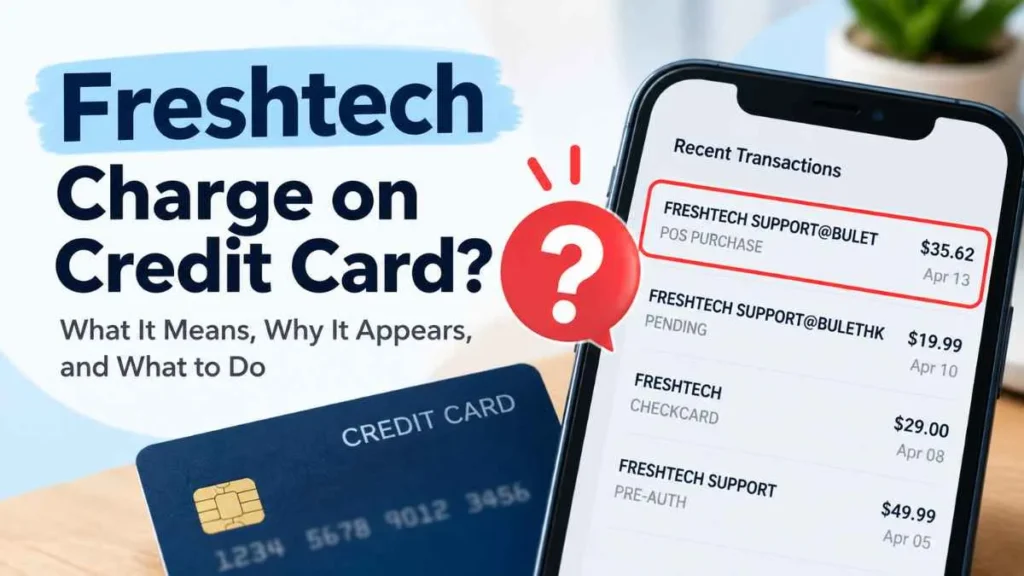
A freshtech charge on credit card statements can be confusing, especially when you do not remember making the purchase. The transaction may appear as FRESHTECH, FRESHTECH SUPPORT, FRESHTECH SUPPORT@BULET, or FRESHTECH SUPPORT@BULETHK. These descriptions do not automatically prove that a charge is fraudulent or identify one specific merchant. This guide explains what the charge may mean, how to identify it, and what to do if you do not recognize it.
What Is a Freshtech Charge on a Credit Card?
A Freshtech charge is a transaction that appears on your credit card statement under a billing descriptor containing the word Freshtech.
The name shown on a statement may differ from the website, store, or service you remember using. Businesses can use different billing names or payment processors, so the statement description alone may not reveal the exact merchant.
For this reason, seeing “Freshtech” does not by itself mean the transaction is a scam.
Why Did Freshtech Charge My Credit Card?
There are several possible explanations:
You Made an Online Purchase
You may have made a purchase from a website or through an online advertisement, while the transaction appeared under a different billing descriptor.
Check your email receipts, order confirmations, and purchase history for the same date and amount.
You Signed Up for a Service or Trial
A charge could be connected to a service, membership, or trial you previously agreed to. Review recent subscriptions and payment confirmations before assuming the transaction is unauthorized.
An Authorized User Made the Purchase
If another person is an authorized user on your credit card, ask whether they made the transaction.
The Charge May Be Unauthorized
If nobody connected to the account recognizes the purchase, treat it as potentially unauthorized. Contact your credit card issuer and ask for the merchant information associated with the transaction.
What Does FRESHTECH SUPPORT@BULET Mean?
Some consumers have reported statement descriptions such as:
- FRESHTECH SUPPORT@BULET
- FRESHTECH SUPPORT@BULETHK
- CHECKCARD FRESHTECH SUPPORT@BULET
- POS PURCHASE FRESHTECH SUPPORT@BULET
- PRE-AUTH FRESHTECH SUPPORT@BULET
- PENDING FRESHTECH SUPPORT@BULET
These are variations of the billing descriptor shown on a card statement. BULET or BULETHK does not, by itself, establish the exact legal merchant or its location.
If you see one of these descriptions, the safest approach is to verify the specific transaction with your card issuer.
Is the Freshtech Charge Legitimate or a Scam?
There are consumer reports questioning some Freshtech-related charges. For example, a 2026 BBB Scam Tracker report describes a consumer who reported a $35.62 Freshtech charge after encountering a pop-up claiming that their device had viruses. The consumer said they could not reach the Freshtech phone number and later contacted their card company.
However, one consumer report does not establish that every Freshtech transaction is fraudulent. A legitimate purchase could also appear under a billing descriptor that the cardholder does not recognize.
The important question is whether your specific transaction can be connected to a purchase or service you authorized.
How to Find Out What the Freshtech Charge Is
Before disputing the transaction, check:
- The amount and date — Compare them with recent purchases.
- Your email — Search for “Freshtech,” the exact amount, or order confirmations.
- Online purchases — Review recent orders and purchases made through social-media advertisements.
- Subscriptions and trials — Check services you recently joined.
- Authorized users — Ask anyone else who uses the card.
- Your card issuer — Ask for additional merchant details if you still cannot identify it.
What Should You Do If You Don’t Recognize the Charge?
If you cannot connect the transaction to a purchase, contact your credit card company promptly.
Ask the issuer whether the charge was authorized and whether additional merchant information is available. If you believe the transaction is unauthorized, ask about the process for disputing it.
For U.S. credit cards, the CFPB recommends notifying the card company promptly and sending a written billing-error notice within 60 calendar days after the charge appeared on your statement to protect your billing-error rights.
Keep copies of your communications and relevant receipts or account records.
How to Dispute a Freshtech Charge
The appropriate process depends on what happened.
If you never authorized the transaction: Contact your card issuer and report it as an unauthorized charge.
If you purchased something but never received it: Contact the seller first when possible. If the issue remains unresolved, ask your card issuer about disputing the transaction. The CFPB notes that failure to receive merchandise can qualify as a credit-card billing error.
Follow your card issuer’s instructions and provide supporting information when requested.
What If the Charge Followed a Virus Warning?
Be especially cautious if the charge appeared after a pop-up claimed that your computer had viruses or told you to call a support number.
The FTC warns that tech-support scams can use fake security warnings to persuade people to provide money, passwords, or remote access. The FTC also advises consumers not to rely on phone numbers displayed in suspicious pop-ups.
If you shared passwords or financial information, change affected passwords and contact your financial institution promptly.
How to Prevent Unknown Credit Card Charges
You can reduce the risk of unfamiliar transactions by:
- Reviewing credit card statements regularly.
- Keeping records of online purchases and subscriptions.
- Avoiding suspicious pop-ups and unexpected support calls.
- Using strong, unique passwords.
- Enabling transaction alerts from your card issuer.
- Checking the exact merchant name before assuming a charge is fraudulent.
Frequently Asked Questions
Is a Freshtech charge automatically a scam?
No. The word “Freshtech” alone does not prove that a transaction is fraudulent. Investigate the specific charge.
What does FRESHTECH SUPPORT@BULET mean?
It is a billing descriptor that some consumers have reported seeing on card statements. It does not, by itself, identify the exact legal merchant.
What does FRESHTECH SUPPORT@BULETHK mean?
It is another reported variation of the Freshtech billing descriptor. The descriptor alone does not establish who ultimately processed the transaction.
Can I dispute a Freshtech charge?
Yes, if you believe the transaction is unauthorized or qualifies as a billing error. Contact your card issuer and follow its dispute process.
What should I do first?
Check the date, amount, email receipts, subscriptions, recent online purchases, and authorized users. If you still cannot identify the transaction, contact your card issuer.
Final Takeaway
A freshtech charge on credit card statements can have different explanations, and the descriptor alone is not enough to determine whether the transaction is legitimate or unauthorized. Check your purchase records first, then contact your card issuer if you cannot identify the charge. If the transaction appears suspicious, act promptly and keep documentation of your dispute.
Read Also:-FID BKG SVC LLC MONEYLINE Charge

Emma Rose is a U.S.-based personal finance writer and a regular contributor at Cardix.us. She focuses on topics like credit cards, credit scores, and everyday money management. Emma’s writing makes complex financial concepts simple and practical, helping readers make smarter credit and spending decisions with confidence.

