
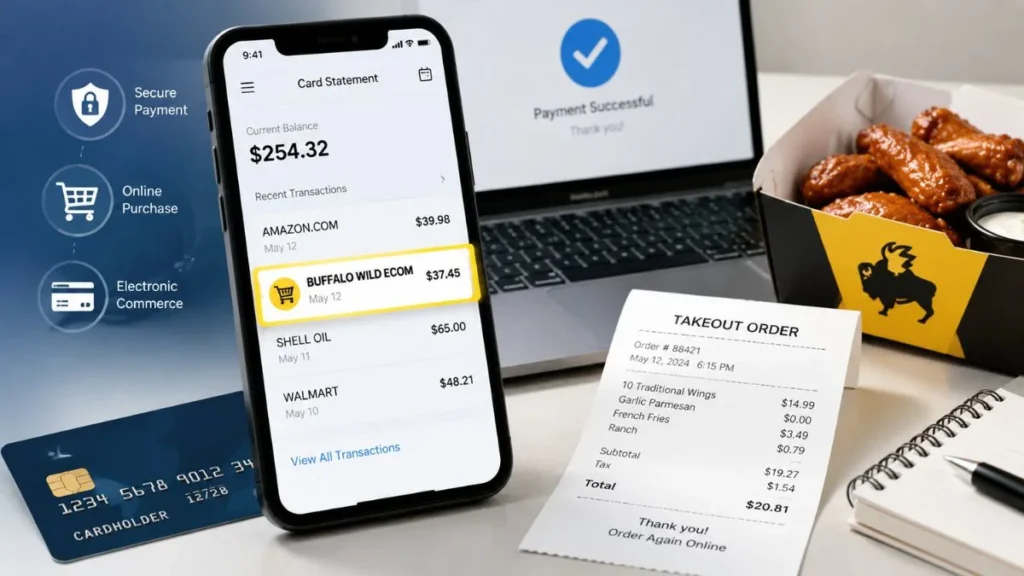
Seeing a Buffalo Wild ECOM charge on credit card statement can be confusing, especially if you do not remember making a purchase. This charge is usually related to Buffalo Wild Wings and commonly appears for online payments made through its website or mobile app. The term “ECOM” means electronic commerce, which indicates that the transaction was processed digitally. While this charge is not automatically fraudulent, you should verify the transaction through your receipts, order history, and account activity to confirm whether it is a legitimate purchase.
What Is BUFFALO WILD ECOM Charge?
BUFFALO WILD ECOM is a merchant descriptor that appears on credit or debit card statements when a payment is processed by Buffalo Wild Wings.
Banks and payment processors often use shortened merchant names instead of displaying the complete business name. This is why a transaction may appear as BUFFALO WILD ECOM instead of the full Buffalo Wild Wings name.
The descriptor can be broken down as:
- BUFFALO WILD – Refers to Buffalo Wild Wings
- ECOM – Means Electronic Commerce, indicating an online or digital payment
- Numbers (such as 3761) – May represent payment processing details or merchant reference information
This type of charge generally indicates that a Buffalo Wild Wings payment was completed through an online channel.
Why Did I Get a BUFFALO WILD ECOM Charge?
There are several possible reasons why this charge may appear on your credit card statement.
Online Food Order Through Website or App
The most common reason is an online order placed through Buffalo Wild Wings.
This may include:
- Food orders through the official website
- Mobile app purchases
- Delivery orders
- Online pickup orders
When customers complete payment through digital checkout, the transaction may appear with an ECOM descriptor.
Pickup or Delivery Payment
Even if you picked up your food from a restaurant location, the charge may still appear as an online transaction if you completed payment through the website or app.
The way a charge appears depends on the payment processing system used during checkout.
Someone Else Used Your Card
If you do not remember making the purchase, another person may have used your payment method.
Possible situations include:
- A family member placed an order
- Someone used a shared account
- An authorized card user made the payment
- Someone accessed your saved payment information
Before assuming fraud, check with anyone who may have access to your card or account.
Saved Payment Method or Gift Card Purchase
The charge may also come from a previously saved payment method or an online gift card purchase.
Examples include:
- A card saved in a Buffalo Wild Wings account
- A linked ordering account
- Digital gift card purchases
Is BUFFALO WILD ECOM Charge Legit or a Scam?
A BUFFALO WILD ECOM charge is usually a legitimate Buffalo Wild Wings transaction. The charge name itself does not mean your card has been compromised.
The charge is likely legitimate if:
- You recently ordered from Buffalo Wild Wings
- The amount matches your purchase
- You received an email receipt
- A family member or authorized user made the transaction
However, you should investigate the charge if:
- You have never used Buffalo Wild Wings
- Nobody recognizes the payment
- Multiple unknown charges appear on your card
- The transaction amount or timing looks unusual
An unfamiliar charge should always be verified before assuming it is fraud.
How to Verify a BUFFALO WILD ECOM Transaction
If you do not recognize the charge, follow these steps:
Check Your Email
Search your inbox for:
- Buffalo Wild Wings
- BWW
- Receipt
- Order confirmation
You may find details about the purchase date, amount, and order information.
Review Your Account Activity
Check your Buffalo Wild Wings account for:
- Recent orders
- Rewards activity
- Saved payment methods
Check Your Credit Card Statement
Review:
- Transaction date
- Amount charged
- Merchant details
- Location information
These details can help identify whether the charge matches your activity.
What Should I Do If I Don’t Recognize BUFFALO WILD ECOM Charge?
If you still cannot identify the transaction, take action.
First, contact Buffalo Wild Wings and ask whether they can verify the order details.
If the transaction is unauthorized, contact your credit card issuer to:
- Report the charge
- Request an investigation
- File a dispute if necessary
You should also consider:
- Freezing your card temporarily
- Reviewing recent transactions
- Replacing your card if your information may be compromised
Can BUFFALO WILD ECOM Charge Be a Scam?
The BUFFALO WILD ECOM descriptor itself is not a scam. It is generally used for Buffalo Wild Wings electronic payments.
A scam only occurs when someone uses your card information or account without your permission.
If you do not recognize the transaction, verify it first and contact your credit card company if you believe it was unauthorized.
Frequently Asked Questions
What is BUFFALO WILD ECOM on my credit card?
It is usually an online payment processed by Buffalo Wild Wings through a website, mobile app, delivery order, or digital checkout.
Is BUFFALO WILD ECOM a subscription charge?
No. It is generally a one-time purchase transaction, not a recurring subscription.
Why does my statement show BUFFALO WILD ECOM 3761?
The extra numbers may be related to transaction processing or merchant identification details.
Can I dispute a BUFFALO WILD ECOM charge?
Yes. If you did not authorize the transaction, contact your credit card issuer and request a dispute investigation.
Final Thoughts
A Buffalo Wild ECOM charge on credit card usually means an online transaction connected to Buffalo Wild Wings. In most cases, it is a legitimate payment for food orders, delivery, pickup, or another digital purchase.
If you recognize the transaction, no action may be needed. If you do not recognize it, verify the charge through your receipts, account activity, and credit card details before contacting your bank for assistance.
Read Also:-BLINK Charge on Credit Card

Emma Rose is a U.S.-based personal finance writer and a regular contributor at Cardix.us. She focuses on topics like credit cards, credit scores, and everyday money management. Emma’s writing makes complex financial concepts simple and practical, helping readers make smarter credit and spending decisions with confidence.

